

1. Decide what you need to recover
A family-history backup should help you recover the research, not just a picture of the tree. Include the genealogy data, source references, original photographs and documents, research notes, and any separate logs or task records. An image of a chart is useful for reading but cannot replace those files.
Keep the original files received from archives or relatives as well as edited copies. Record where your working research lives and which parts need separate copies. Access to a shared project does not make you its owner, so agree how important shared material will be preserved.
The Verschoor project's owner permitted the screenshots and long-deceased historical examples here. The historical readings come from the project; the originals have not been independently re-read for this guide. No production export or restore was performed for the screenshots.
2. Export and download the project

In Leaves, open Overview and choose Export GEDCOM. Read any mapping warnings, wait for the ready email, then download while signed in to the authorized account. Save the downloaded file in your own backup location. A download link is temporary; it is not a durable copy of your research.
The current exporter writes GEDCOM 7.0. With uploaded media or permitted research tasks, project
export produces a .gedzip archive containing gedcom.ged, uploaded media
files and, when tasks are present, research-tasks.json and
RESEARCH-TASKS.txt. Without uploaded media or permitted tasks, the result is a plain
.ged file. A missing-file reference cannot recover bytes that are absent from the
project.
3. Keep companion files and account exports in context
Keep the whole archive, including its task companions. Tasks, results and task history are outside standard GEDCOM; importing the genealogy file does not restore them. Read the companion instructions and preserve the files even when another genealogy program ignores them.
Leaves also offers Profile → Your data → Export everything. Its account ZIP covers projects you own, their genealogy and media, task companions and profile data. It does not automatically include shared projects owned by another person. It is not a one-click restoration of account history, discussions or settings. See the export and recovery manual for the current boundaries.
Project owners can export; collaborators need the owner's separate export permission. Their access and privacy rules constrain the result. Before depending on someone else's export, establish whose copy it is and which scope was included.
4. Inspect the copy and test recovery
Check that the download opens, the genealogy file is present, and several original images can be read. For a meaningful test, import a copy into a separate project or the receiving program. Keep the original project intact while you compare the result. Read warnings and check names, relationships, sources, notes and uncertain dates.
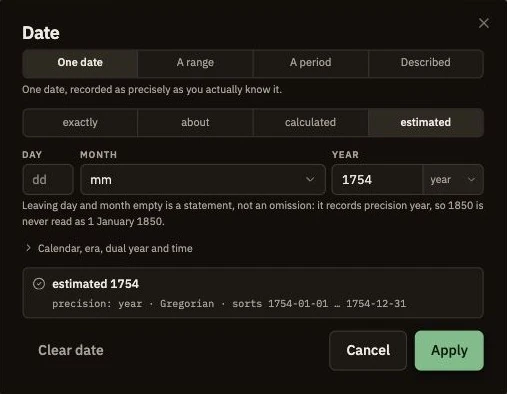
The estimate comes from the project's reading of age 72 in his 1826 death entry, 106 / 300 / entry 24. A transfer that turns it into an exact day would change its meaning. Use the import checklist to compare other features as well. Record any unsupported or missing information and how you will retain it separately.
5. Keep separate versions and locations
Keep more than one dated copy, including one in a location independent of the working research. A synchronized folder can carry an accidental deletion or unwanted edit to other devices; retained versions help you return to an earlier state. Choose a routine you can maintain and record the last successful recovery check.
Create a fresh copy after substantial research and before imports, merges or a handover. Avoid replacing every older copy with the newest file before checking it. Label each copy with its date, project, export scope and any known omissions so another person can understand what it contains.
6. Leave a recovery note someone can follow
Write a short inventory explaining where the genealogy file, media originals, research logs and task companions are stored, and how to open them. Keep account recovery instructions secure and separate from a public family narrative. A relative should be able to locate the research without needing to guess which archive is complete.
Review who can access backup copies containing information about living people. Removing someone's access to a project cannot recall a file already downloaded. Use the sharing guide when arranging a family handover, and check your recovery process again after changing software or export format.