

1. Agree on what the relative will do
Start with a practical purpose: read a finished branch, identify people in photographs, or help research one unresolved question. That determines the access needed and the context you should provide. A relative who wants to read does not necessarily need permission to edit the research.
The Verschoor project's owner permitted these screenshots and examples involving long-deceased people. Historical readings come from the project; the originals have not been independently re-read for this guide. The invitation shown was a local draft with no recipient entered. No invitation was sent and no project access was changed.
2. Choose the role deliberately
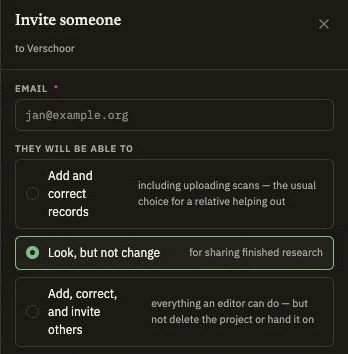
In Leaves, open Overview → Who has access → Invite. Viewer is for reading. Editor is for adding and correcting records, including uploads. Admin can also invite others and perform additional project management; it does not transfer ownership. Read the role descriptions and current plan limits in the app before sending.
Enter the intended recipient's email carefully, choose the role, and add a useful introduction. Send the invitation when those choices match your agreement. After acceptance, confirm the collaborator and role in Who has access. The collaboration manual covers invitations, expiry, role changes and removing access.
3. Review living-person access separately
The owner controls Show details of living people, which is off by default. This permission is separate from Viewer, Editor or Admin. A role change does not automatically change it. Check explicit restrictions on records and evidence as well; allowing living-person details is not permission to see every restricted item.
The app's “Possibly living” classification is a heuristic. Missing death information is not proof that a person is alive, and an old birth is not a reason to invent a death date. Correct supported facts and review the intended access. These project settings do not publish the tree as a public website.
Check the result using the intended recipient's account, with their participation, rather than relying on the owner's view. If an access result differs from what you expect, resolve that difference before sharing the affected information. Review living-person and explicit restriction guidance for the current limits.
4. Give the relative enough context to contribute
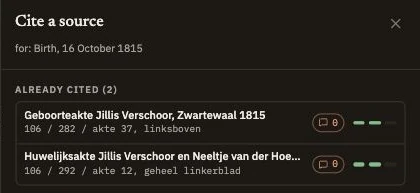
The retained marriage reference is Zwartewaal 1837, 106 / 292 / entry 12. The project keeps 16 October 1815 with qualified support. Explain what has already been checked, the remaining limitation and what evidence would help. “Find more ancestors” gives a collaborator much less direction.
Keep the comparison of conflicting evidence beside the person. Use a record discussion for the question when the collaborator has permission to participate. Readers can inspect discussions they are authorized to see; replying requires editing access. Someone who only wants to read can remain a Viewer.
5. Coordinate changes and downloaded copies
Agree which branch or question each contributor will work on. Keep citations with new claims and describe revised conclusions in the research note. Change history helps review recorded changes, but it is not a general restore-any-version tool. Take a fresh backup before substantial restructuring.
Collaborator export is a separate owner-controlled permission, Let collaborators export GEDCOM. Do not assume a Viewer can download the genealogy because they can read it. Conversely, a downloaded copy cannot be recalled by later removing project access. Agree how copies and sensitive material will be handled.
6. Review access as the work changes
After the first contribution, check that the relative can find the relevant person, understand the source references and distinguish a proposed correction from a settled conclusion. Resolve a discussion only when the research question has actually been addressed, then update the fact, citation or note that readers will rely on.
When the work changes or someone no longer needs access, review their role and permissions. Removing access leaves their contributions in the project. Keep authorship visible and preserve the research explanation. A clear purpose, deliberate access and a small well-documented question make family collaboration easier to continue.