

1. Keep the originals and their context
Begin with one envelope or album. Give each photograph a stable reference, scan the front and back, and keep an unedited master. Preserve inscriptions, album order and the name of the person who supplied it. A cropped face is useful for a portrait, but the surrounding people, photographer's mark and handwritten notes may be the clues that identify it later.
Keep a separate working copy for adjustments. Record which physical photograph each file represents and where the original is stored. Do not silently replace a master with a colourised, restored or AI-generated version; label those as edited illustrations and retain the original alongside them.
The Verschoor project's owner permitted these production screenshots of historical material. The examples below are an archive-index image about an 1837 marriage, not family photographs. They demonstrate shared media controls without inventing a photographic identification. Historical readings come from the project; the originals have not been independently re-read for this guide.
2. Describe the file before identifying faces
In Leaves, open Media and choose Add files. Use a meaningful caption and choose the appropriate kind, such as Photograph or Document scan. In the caption, distinguish what is visible, what an inscription says and what a relative remembers. For an unknown image, a description such as “Three adults outside a brick house; names not yet established” is more useful than a confident guess.
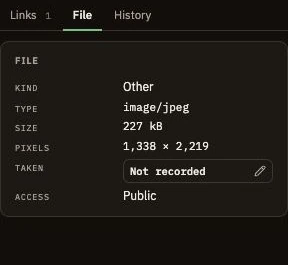
Record the donor, photographer if known, original format, storage reference and any permission to reproduce it. A file's creation timestamp may describe a scan or a download. Use the Taken field only for a supported image date, preserving its uncertainty rather than borrowing an ancestor's birth or marriage date.
3. Test an identification against the family history
Ask relatives separately who they recognise and how they know. Keep their wording and the date of the conversation. Compare the proposed identity with the person's lifespan, locations, relatives and the photograph's physical clues. Resemblance alone is a starting point for investigation. Leave uncertain names in a clearly qualified research note until the evidence supports a link.
The example image concerns Jilles Verschoor and Neeltje van der Hoeven. The project's marriage reading points to Zwartewaal, 1837, entry 12. That historical context helps identify the subject of a document image; it cannot establish that an unrelated portrait shows either spouse. Use the identity checklist for the same distinction between a plausible match and a supported conclusion.
4. Link what is depicted and what the file supports
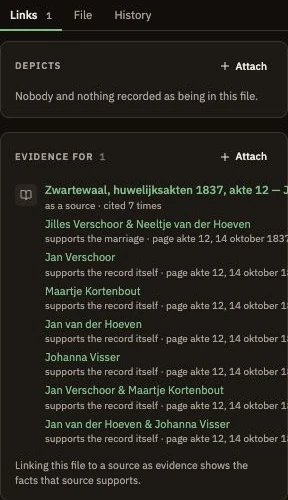
Use Depicts for identified people, families or places shown in a file. Use Evidence for to attach documentary evidence to its source. A photograph can be linked to several people without uploading duplicate copies. Keep a caption that identifies positions, such as left to right, so readers can understand a group photograph.
5. Choose a portrait without losing the full image
Once a person is identified and linked, you can use that depiction as their portrait. Adjust the portrait crop to frame the face, then check it at the size used on person cards. Leaves retains the original image; the portrait crop is a presentation choice. Removing a portrait does not erase the underlying file. See the media and portraits manual for the controls and supported files.
6. Preserve the collection and share with context
Review access, permissions and the identities of living people before sharing. An old photograph is not automatically free to reproduce. Include the caption, credit and uncertainty with any copy you send, and keep masters in your backup routine. Leave a short inventory so the next custodian can reconnect the digital files with the physical album.